sarif-kit

Convert the native output of scanners and linters into valid SARIF 2.1.0, ready for GitHub Code Scanning.
pip-audit, codespell, yamllint, pylint and PlatformIO's pio check all report things
worth fixing, and none of them can emit SARIF, the
format GitHub Code Scanning reads.
The feature requests asking for it have been open for years, the codespell one since 2020.
sarif-kit converts what those tools already print into SARIF you can hand straight to
github/codeql-action/upload-sarif.
In GitHub Actions
Run the tool the way you already do, convert what it printed, then upload:
permissions:
  contents: read
  security-events: write

steps:
  - uses: actions/checkout@v7
  - name: Lint YAML
    run: pipx run yamllint -f parsable . > yamllint.txt || [ $? -eq 1 ]
  - name: Convert to SARIF
    uses: sarif-kit/sarif-kit@v0.3.0
    with:
      tool: yamllint
      input: yamllint.txt
      output: yamllint.sarif
  - name: Upload to Code Scanning
    uses: github/codeql-action/upload-sarif@v4
    with:
      sarif_file: yamllint.sarif
      category: yamllint
The action runs from a prebuilt container image, so nothing installs Python on your
runner. Give each tool its own category on upload. Without that, they overwrite each
other's alerts.
| input | required | meaning |
|---|---|---|
tool |
yes | pip-audit, yamllint, codespell, platformio, pylint, or auto to detect it from the input |
input |
yes | file holding the tool's native output |
output |
no | SARIF file to write, defaults to results.sarif |
src-root |
no | repository root, used to rewrite absolute paths as relative ones |
dep-file |
no | manifest that pip-audit findings point at, defaults to requirements.txt |
fail-on-findings |
no | set to true to exit 1 when the converted file has findings |
The guard on the lint line matters. Most linters exit nonzero when they find something, and you want the job to carry on to the upload rather than stop at the scan. Each adapter page below gives the exact capture command for that tool, since the exit codes differ.
sarif-kit/demo is a repository broken on purpose that runs every supported tool this way, if you want to see the alerts before wiring anything up.
On your machine
Either of these puts a sarif-kit command on your PATH:
uv tool install sarif-kit
pipx install sarif-kit
For a one-off run without installing anything, uvx sarif-kit works too.
Python 3.11 or newer. The only dependency is jsonschema.
yamllint -f parsable . > yamllint.txt || [ $? -eq 1 ]
sarif-kit convert --tool yamllint -i yamllint.txt -o results.sarif
Supported tools
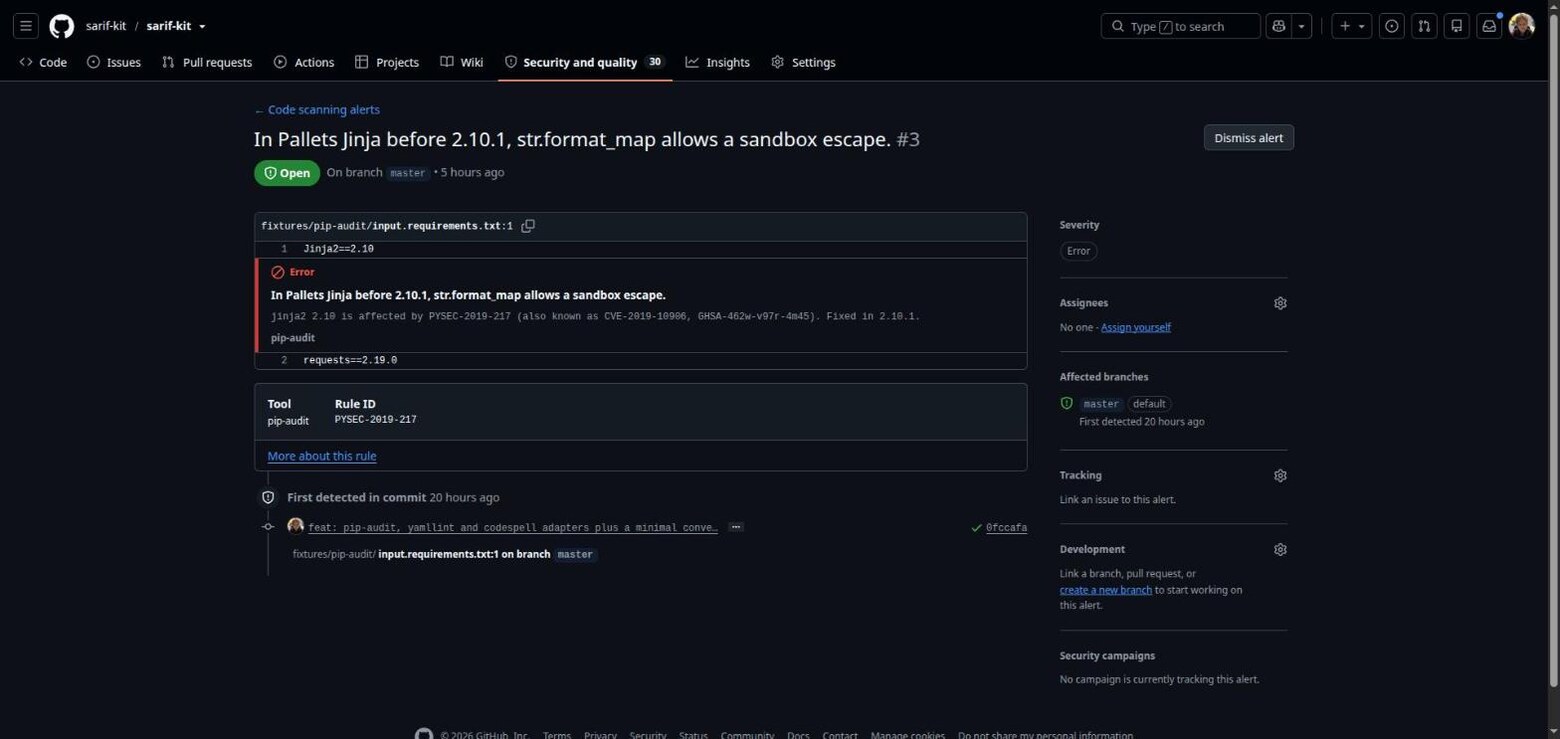
- pip-audit: one alert per advisory, linked to its osv.dev page and reported as an error
- yamllint: line and column preserved, yamllint's own error and warning levels kept
- codespell: one rule per typo, so alerts read
"lenght" should be "length"instead of all sharing a title - PlatformIO check: cppcheck defects with line, column and CWE, absolute paths rewritten so alert links resolve
- pylint: one rule per message symbol, linked to its documentation page, with convention and refactor findings kept at note level so the errors stay visible
Here is a pip-audit finding as GitHub renders it, converted by sarif-kit:
Commands
sarif-kit convert (--tool NAME | --auto) -i PATH -o PATH [--src-root PATH] [--dep-file PATH] [--fail-on-findings]
sarif-kit validate PATH
sarif-kit merge -o PATH INPUT [INPUT ...]
--auto works out the adapter from the shape of the input, and refuses to guess when the
input matches nothing or matches two tools at once. -i and -o accept - for stdin and
stdout. --src-root rewrites absolute paths relative to your repository root, which is
what makes the file links in an alert resolve. merge combines SARIF files into one
upload, one file per tool, because GitHub rejects a file whose runs share an analysis
category.
| exit code | meaning |
|---|---|
| 0 | success |
| 1 | findings present under convert --fail-on-findings, or the file failed validation under validate |
| 2 | conversion, usage or IO error |
Full reference: man -l man/sarif-kit.1 from a clone.
Nearby tools that sound similar
- microsoft/sarif-tools and the "SARIF Converter" Marketplace action go the other way, turning SARIF into CSV or HTML. sarif-kit produces the SARIF they read.
- MegaLinter and reviewdog want you to adopt their whole pipeline. sarif-kit is one command you drop into the CI you already run.
- node-sarif-builder is a library for tool authors writing SARIF by hand. sarif-kit is the finished converter for people who just want a scanner's findings in the Security tab.
The quality bar
Passing the schema is not what makes an adapter finished here. Every adapter is uploaded to a real repository and inspected in GitHub's Code Scanning UI, and if the alert does not show the right title, severity and file link, it goes back. The action gets the same treatment: it is not documented here until it has run green in the demo repository and the alerts it produced have been read.
Development
uv sync
uv run pytest                    # unit, golden and schema tests
UPDATE_GOLDEN=1 uv run pytest    # refresh golden files after an intentional change
The upload gate
A schema-valid file can still be turned away by GitHub, which applies rules of its own, so the real test is an upload. The "Upload gate" workflow does exactly that. Start it from the Actions tab, and it runs each supported tool against its committed fixture, converts the fresh output with the CLI built from that commit, uploads one SARIF per tool, then merges two of them and uploads the combined file as well.
Afterwards, look under Security, then Code scanning. Every alert should carry the right title and severity and link to a real line of a real file. Running the gate on a fork needs Code Scanning enabled, which is free on public repositories and needs GitHub Advanced Security on private ones.
To build the minimal gate file locally:
uv run python scripts/gate_minimal_sarif.py gate.sarif